A powerful and useful Data-Flow Visual Programming Language (DFVPL) must provide the necessary programming constructs to deal with complex problems. The main purpose of this paper is to give a contribution to the debate on DFVPL constructs by presenting the solutions we devised for the VIPERS language. Another purpose of the paper is to illustrate the methodology we developed in order to start a comparative usability study for different implementations of control flow constructs. We stress the features of this original methodology, which is effective, easy to implement in different working contexts (even remote ones), and which gave us interesting clues about the way people inspect visual programs.
Data-flow is one of the most popular computational models for visual programming languages (VPL). One of the most important features which characterizes the power of a data-flow VPL and determines its acceptance is the availability of the rich library of predefined functions to be used as elementary building blocks [1]. Moreover, a powerful and useful data-flow VPL must provide the necessary programming constructs to deal with complex problems (in the language's application domain). Our experience with the VIPERS system [2], developed at the University of Pavia, confirms once more that the pure data-flow model needs to be enriched with some forms of control flow constructs in order to tackle non-trivial applications. Iteration, for instance, has been provided in different ways in several languages. Nevertheless, we feel that satisfactory solutions are very difficult to achieve: sometimes, these solutions use a notation which is not consistent with the data-flow paradigm. In general, visual control structures are difficult to write and even more difficult to understand. The purpose of this paper is to give a contribution to the debate on data-flow VPL constructs. We present the solutions we developed to enrich the VIPERS language (with respect to the pure data-flow model of the first prototype) and the way we tested them. Section 2 will review some different implementations of iteration constructs. Section 3 will then focus on loop control structures in VIPERS. Section 4 will illustrate the methodology we developed in order to start a comparative usability study for different implementations of control flow constructs. Finally, section 5 will report the conclusions we achieved.
Whatever kind of programming language you are concerned with, be it textual or visual, iteration means repeating several times a body of code, usually for repeated modifications of some variable.
More precisely, two basic iteration forms can be distinguished [3]: horizontally parallel iteration and temporally dependent iteration (also called sequential iteration). While in the former the outcome of one cycle does not affect the outcome of the next one, the latter implies such a dependence.
Two main approaches have been proposed to tackle sequential iteration in data-flow visual programming [4]. One (followed by VIPERS) admits the presence of cycles within the program graph. Essentially, every function or variable is considered as having a stream of values associated with it, instead of a single value, and data flow cycles may be thought of as being broken by "loop variables". Such variables, which hold pairs of values (old, new), may be seen as the input variables of those blocks at the entrance of the looped subgraph (where for "block" we intend the elementary computational entity of the visual language). The other approach for tackling sequential iteration, instead, avoids cycles completely, being based on the creation of a "fresh copy" of the iterated subdiagram for every loop execution.
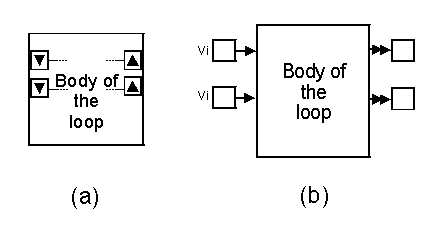
In the remainder of this section, various iterative construct implementation approaches followed by some well-known data-flow visual languages will be briefly analyzed. We start with LabView [5], one of the commercially most widespread visual languages based on the data-flow paradigm. A LabView program is made up of a graph whose nodes identify functions, variables and constants. Two iterative forms are available: the "FOR loop" and the "WHILE loop". In both of them, the iteration body, that is the program subgraph whose execution is to be repeated, is placed within a proper pane (a square-shaped big block). For the FOR loop, an integer value indicating the number of iterations to be accomplished must be specified, whereas in the case of the WHILE loop the cycle execution is repeated for as long as a boolean condition, visually expressed, is satisfied. Since LabView program's graphs are acyclic, a mechanism for updating those possible variables depending on previous iterations is necessary. With reference to Figure 1a, which schematizes a LabView loop pane, to get an arc (data) exiting the loop on the right to virtually re-enter it on the left, such an arc must be connected to an upward arrow. The horizontally corresponding downward arrow, on the left, represents the re-entry point (used to set the variable's initial values as well).
On the one hand, such kind of representation avoids the confusion which might arise from introducing cycles into the program graph. But, from the other hand, it may be some a strict limit, since the intuitive flow of data is totally disjointed from their actual "backward-jump" path.
Visual languages such as Show-and-Tell [6] and Hyperflow carry out loops in a way very similar to LabView's. Referring to Figure 1b, which schematizes a Show-and-Tell's loop construct, variable "boxes" on the right contain the current loop's output values, which will re-enter on the left side (vi are the initial values). The iteration body is executed until a boolean condition, visually expressed within it, is no longer true.
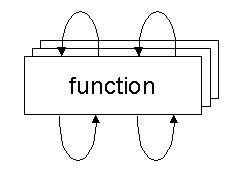
Some experimental languages, such as V [7], investigate more direct approaches to managing those data structures typical of traditional textual programming (arrays, matrices, etc.), by proposing particular iterative constructs based on pattern matching. Prograph offers different special constructs for treating horizontally parallel iteration and sequential iteration. Repetitive operations not depending on previous data, such as array traversals, can be accomplished without the need for a loop structure, in virtue of the ability of some visual functions to apply themselves repeatedly to each element in the sequence. As regards sequential iteration, outputs of one function are allowed to become its inputs (Figure 2).
The way loops are attained in Cantata [1], a graphically expressed, data-flow visual language providing a visual programming environment within the Khoros image processing system, is totally different. A Cantata program is made up of an acyclic graph, whose nodes (glyphs) represent functions. A program may have global variables associated with it, i.e. alphanumeric symbols denoting, for example, numeric values. Such variables, which are globally defined and accessible through a proper pane, can be set to particular initial values and modified by glyphs during program execution. Since variables are not directly visible, they represent a sort of hidden information. The two iteration forms provided by Cantata, the "Count Loop" and the "While Loop", are based on the same philosophy, concealing the loop implementation details from the programmer and founding iteration on variable values and on conditions defined in the control panels of the loop glyphs. To create an iterative construct, those glyphs pertaining to the program's subgraph which will form the loop's body, must be selected. The glyphs picked will be replaced with a new block (Count Loop or While Loop), in a way very similar to macro creation in VIPERS. Following this, the loop behavior must be defined through a proper pane. In the case of the Count iteration form, the programmer has to specify a loop variable and its initial and final values, as well as the increment amount at every step. In the case of the While iteration form, instead, the conditional expression (generally involving variables) which will be used to determine how many times the loop is to be executed must be provided (and, possibly, an initial and an update expression). Loop glyphs's input data are the same at every iteration step: it is up to the implicit loop variables to select, if necessary, particular components (e.g. a vector's elements).
Therefore, in the loop there is no explicit information re-circulation, but rather a repeated execution of a sub-graph. It is clear how Cantata's approach to implementing loops, while compact, is not very flexible and depends on parameters which, not being explicit, are hardly intuitively controllable.
Another data-flow visual language supporting iteration is VEE (Visual Engineering Environment) [8], from Hewlett-Packard. VEE programs are built by selecting objects (square-shaped blocks representing functions and control flow elements) from menus and wiring them together. VEE objects, besides ordinary input and output ports, have a "sequence-out" pin, which is activated when the object has completed its function, and a "sequence-in" pin, used to force outputs unconditionally. Connecting objects by these control ports provides a form of synchronization for VEE program elements (in a way similar, though not identical, to the VIPERS synchronization mechanism). Although VEE program's graphs are allowed to contain cycles, two ready-made iterative constructs are also provided: the "For-Count" and the "Until-Break". The For-Count object (Figure 3a) emits sequentially, as data, integer values, starting from zero up to n-1, where n is the number of iterations to be completed. The sequence-out pin can be exploited to directly activate other objects.
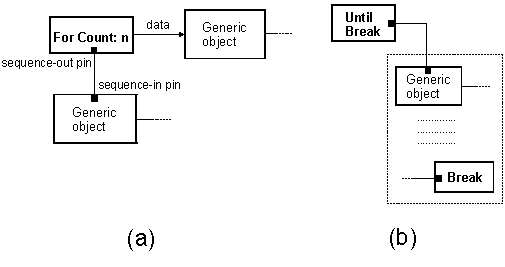
The Until-Break block's sequence-out pin (Figure 3b) drives execution of the program subgraph connected to it, which is repeated until a "Break" object is encountered. A Break object is usually the target of the "then" path of an "If/Then/Else" control block, incorporating a condition to be satisfied by its input data.
In general, there is a tendency to consider cycles within visual as something to be avoided at all costs, because of the confusion they may generate. Nonetheless, various data-flow visual languages have been developed in which iteration can be implemented only in the form of cycles. The following are some examples [1]: Hookup (a language for music), InterCONS (for creating user interfaces), VIVA (for image processing) and Viz (general purpose).
If it is true that cyclic graphs may be a hindrance to program comprehension, it is also true that they are able to naturally express the flow of data, without needing implicit information or specific interpretation conventions. In particular, in VIPERS cyclic graphs are permitted and can be exploited to explicitly create iterative forms. Thanks to its flexibility, however, VIPERS also allows to embody some loop constructs' implementation details into single blocks, which can be created as library functions (or, better, as library control structures) or macros. Thus, pure parallel iterations can be implemented without any cycle within the program. It is for the programmer to choose, according to his/her preferences or to the characteristics of the program being constructed, which of the two loop implementation philosophies to follow.
This section is devoted to a brief analysis of how loop control structures are built in VIPERS.
As already stated, VIPERS allows the programmer to freely choose whether to explicitly construct parallel iterations, by introducing cycles into the program graph, or to use compact forms simulating loop behaviors.
A typical case of parallel iteration is sequential access to all the elements of a data structure, so that certain operations can be performed on them. Figure 4 shows the explicit structure of a Foreach construct, which, given a generic list (L), sequentially emits its elements (E). Input ports are on the left side, while output ports are on the right side. To achieve a correct synchronization, VIPERS exploits control signals (thin arcs without arrows) connecting blocks' control ports (those with the lightning symbol). If there exists a signal between an output control port (on the right) of block A and the input control port (on the left) of block B, then block B can not be executed before execution of block A. More than one signal may arrive at the same input port: for the correspondent block to be enabled, it is sufficient that at least one of them is active.
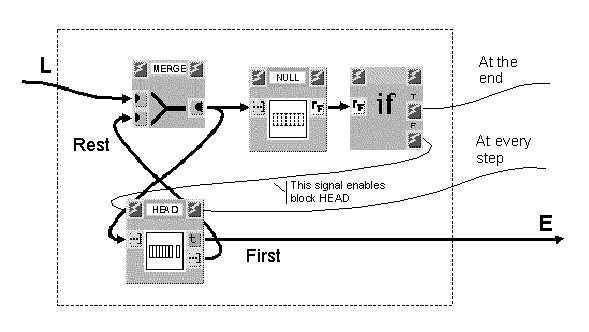
The MERGE block fires when either of its two input ports receives a new data item, which is then emitted as an output. Such block is mostly used as the entry point of loop structures, thanks to its ability to accept both an initial input value and successive updatings of it.
As can be easily seen from the figure, the initial list enters block MERGE, leaving it unchanged, then is both posted at the input of block HEAD and analyzed by the boolean block NULL. This block verifies whether the list's length is zero (in which case gives "true" off) or greater than zero (in which case gives "false" off).
If the list is not null, block IF activates the signal relative to its "false" output control port (F), thus enabling block HEAD. This block separates the input list's first element (First), made available, from the remainder (Rest). The "beheaded" list then re-enters block MERGE and this process is repeated until all list's elements have been scanned. The signal emitted by block HEAD every time it is activated can be employed to create a synchronism with execution of possible other blocks which do not directly need data contained in the list being inspected.
Likewise, when the list traversal is finished, the "true" control signal (T) given off by block IF can be utilized to activate new blocks and hence allow the computational process to go on. In the implementation of the "foreach" construct of Figure 4 the graph is made cyclic by the arc going from the output of block HEAD (Rest) to the input of block MERGE.
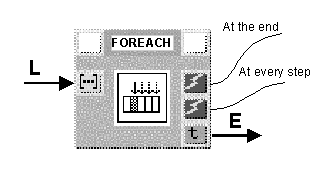
If one prefers to deal with a more compact structure, the whole dotted portion of the figure can be embodied into a single block (a library block or a macro), as shown in Figure 5. Such block has as input the list to be scanned and as output the current element, besides the control signals.
The situation for the For loop construct, whose explicit and compact forms are shown in Figure 6, is analogous. n represents the number of times the subgraph activated by the "false" (F) control signal of block IF is to be executed. Block DECR, enabled as long as the iteration process is not completed, decrements its input data by one and posts them to block MERGE, out of which they arrive unchanged. Block EQUAL compares such data with zero and emits "true" or "false" according to the comparison result. The data flow cycle in the graph is formed by the arc going from the output of block MERGE to the input of block DECR.
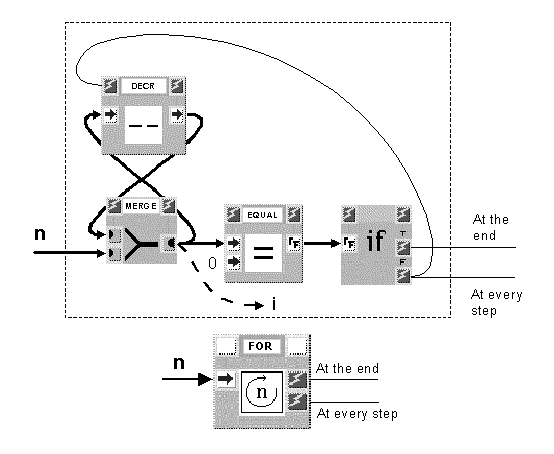
Should it be necessary, besides repeatedly executing a subgraph, to have access to the loop counter (data exiting block MERGE), it can be easily provided by the For structure (i).
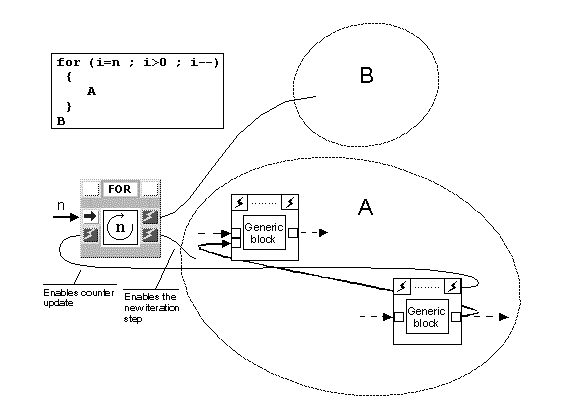
It is to be noted that the subgraph (the loop body) controlled by the For iterative structure (or, in the previous case, by the Foreach structure) may in turn contain cycles, thus implementing a temporally dependent iteration (Figure 7). In this case, however, it might be necessary for block DECR (Figure 6) to be activated by a block inside the loop body instead of being enabled by the "false" control signal of block IF, in order to achieve correct synchronization. In fact, it may happen that execution of complex and long loop bodies has still not finished when a new activation signal is emitted by block FOR.
When it is necessary to wait for the end of an iteration step before starting with the next one, a synchronizing signal must be added to connect the end of the cycle with the FOR block. For this reason, the compact For structure, in the case of sequential iteration, may also require an input control port. Similar considerations are valid for the Foreach structure.
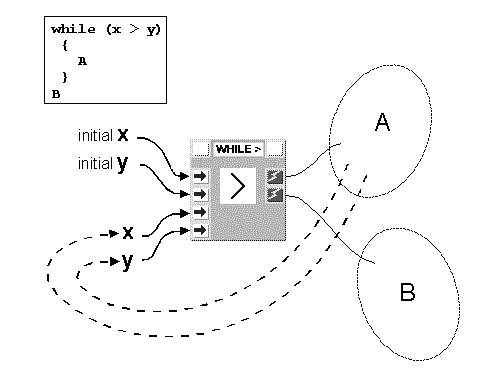
In While constructs, execution of the loop body depends on one or more boolean conditions which are to be satisfied. In Figure 8 the implementation of a While structure depending on two integer variables x and y is shown. The variables are used by the test block GREATER and the body is executed as long as x > y. As in the case of the For and Foreach constructs, the repeated subgraph is allowed to contain cycles, to carry out temporally dependent iterations.
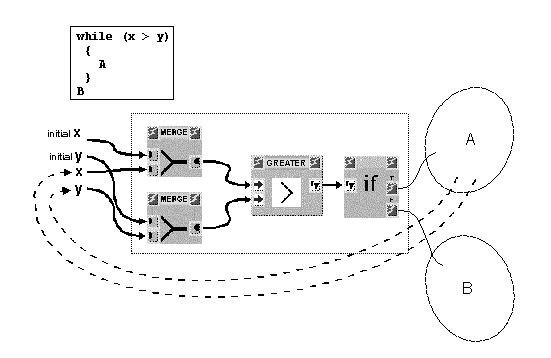
Compacting the While structure (Figure 9) does not eliminate any cycle and generates a control block which, by depending directly on the loop condition, appears less general, though equally expressive, compared with those discussed previously.
In general, possibility to choose between explicit and simplifying compact structures in VIPERS may allow to better explicate, according to the particular context, the characteristics of the program being constructed.
Since loops in data-flow visual languages may be difficult to understand [9] we decided to test the usability of the solutions we devised for VIPERS (described in the previous section). To get useful indications, we opted for a comparative analysis, also referring to the well-known data-flow language LabView [5], where iterative constructs are implemented according to a totally different philosophy (see Section 2).
In this section we will describe the project and the realization of our usability tests, while in the next section we will discuss the results obtained so far.
It is important to stress that the objective of our experimentation was certainly not to reach a definitive verdict but rather to devise a suitable efficient evaluation methodology, in order to let us collect a meaningful set of feedback data upon which to base future re-engineering work on the language. We think that this methodology is worthy of being described as a feasible approach to testing users' understanding of visual languages constructs.
First of all, we decided to organize a small number of evaluation sessions involving the presence of more than one user at the same time.
Among the possible evaluation methods [10], we elicited observational evaluation, which involves observing or monitoring users' behavior while they are using an interface and survey evaluation, which means seeking users' subjective opinions.
To collect data about what users do when they interact with the test interface, employment of direct observation was avoided. In fact, if users are constantly aware that their performance is being monitored, their behavior may be strongly influenced (Hawthorne effect). Video recording (the visible aspects of users' activity) was also excluded, since such a technique requires a strong contribution by psychologists, as well as what the techniques based on verbal protocols would imply. We used software logging to record the dialog between user and system. In particular, our methodology is based on the use of the Log Files of a web server, as will be illustrated farther on.
Not only have users actions been taken into account: we elicited questionnaire forms to support our survey evaluation.
Every usability evaluation is meaningful within a precise context, including the practice level of the testers, the types of task being undertaken and the environment in which the test is carried out.
For our first experiments we decided to work with high school students (17 to 19 years old) with little skill in textual programming and no experience at all in visual programming. We set proper mathematical applications as test tasks. Even though we were aware that many other application domains would be more suitable for a data-flow approach, we opted for problems close to their school experience. As far as the programming environment was concerned, our aim was to make the interaction independent of the computer platforms used (by carrying out tests in an heterogeneous environment -our lab- with both PCs and Mac and UNIX machines). This last consideration also influenced our choice to focus on the program understanding process rather than on program construction. We stress the fact that we did not want to compare the usability of the whole VIPERS and LabView environments, but only to observe how efficiently these two languages visually express control constructs (loops, in particular). As for the number of testers to be employed, we referred to the literature about the subject [11].
The planning of the experiments required the specification of the purpose of the evaluation in terms of what was being changed, what was being kept constant and what was being measured. We planned two sessions with six users. Altogether, six users tackled a set of three problems through VIPERS and six the same set through Lab-View.
Each user had to examine, in sequence, three visual programs displayed on the computer screen and translate them into correspondent textual programs (in pseudo-Pascal, since they all knew this language). We considered the number of right solutions as a first indicator of the comprehensibility of the languages in the loop implementation (this task, of course, did not require any log analysis). None of the testers were acquainted with the proposed visual languages. In order to understand the programs, they could exploit on-line help. We logged accesses to the portions of help associated with each graphic element of the visual programs, to locate the more troublesome visual structures (whose help pages were consulted more frequently). Moreover, the analysis of the log files allowed us to better understand the way users tend to examine a visual data-flow program.
The three programs that each tester must examine were placed in an increasing order of complexity. Time for the test was set at one and a half hours. Lack of space means we can only present the first problem, (see Figures 10 and 11), which involved the factorial calculation of a keyed in number. Figure 10 shows how with VIPERS the MERGE blocks were exploited in the typical figure of "8" pattern and the enabling signals as described in section 3.
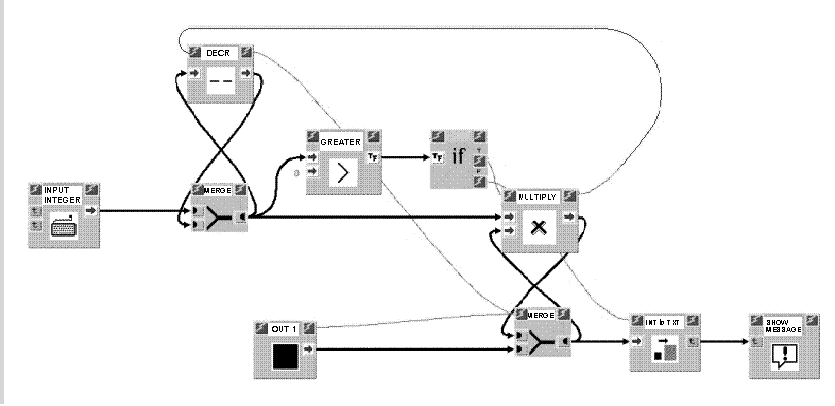
We emphasize that with the experiments carried out with VIPERS so far, we have not wanted to "compact" the representation of cycles as discussed in the above mentioned section. The reason is that we wanted to study the effectiveness of a representation of a program (which is complete albeit heavy) in which all the data flows are represented by an arc. The usability of the more "compact" solution will be assessed in future tests.
In figure 10, the data keyed in enters the MERGE block and is reported at exit. It is compared with value 0: if it is greater, the IF block enables the MULTIPLY block. If lower, the cycle terminates and block INTtoTXT is enabled which transforms the final result (at the exit of the second MERGE) into a text which is then printed. The produced block (MULTIPLY) forms an "8" pattern with the MERGE block: each time it is enabled, it multiplies the data coming from the first MERGE block with the result of the previous multiplication (the first time this is done with number coming from the block OUT1). When the product has been carried out, the enabling signal coming from the MULTIPLY block activates the DECR block: the previous data is decreased by one unity and is reported on exiting from block MERGE for a new iteration.
The idea making the creation of our tests (and generally any tests that can exploit this set up) particularly economical is the use of a web server and its log file. Each problem is presented to the user in the form of a web page: during the test the user interacts solely and exclusively with a web browser, independently of the platform used. In the web page (see Figure 11) the problem is visualized as an image, or rather, as an image map. Image maps are graphics where certain regions are mapped to URLs. By clicking on different regions, different resources can be accessed from the same graphic.
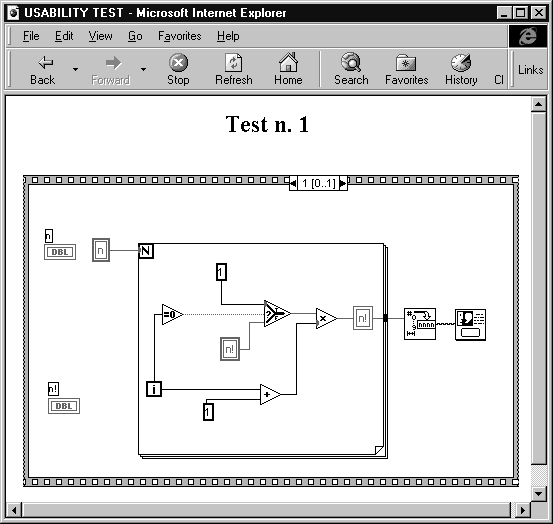
In our case we associated each graphic symbol with a page illustrating its meaning. The log file of the Web server, by registering the actions of the users, was able to reveal how many times (and in what order) each user had clicked on a symbol of the program to ask for the help pages, and how much time the user stopped to read the explanations before returning to the main page using the BACK key. Preparing the test was very simple: care only needed to be taken in inserting a META file in each file (for the HTTP-EQUIV attribute) to exclude the use of the cache. Log file analysis was also made easier by use of a spreadsheet and some analyzers of web log files available on the network.
This subsection briefly reports some of the main results, which will be commented in section 5.
The simplest problem (Figures 10 and 11) was comprehended and correctly illustrated by 5 testers out of 6 on VIPERS and 5 out of 6 on LabView. The second problem was correctly carried out by 3 testers using VIPERS and 4 using LabView. The third problem was correctly done only by one VIPERS tester.
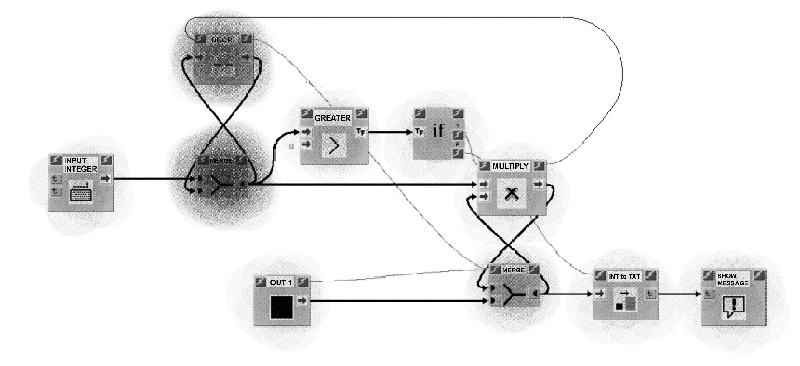
Log file analysis revealed that the access to help files were approximately the same for the two languages, and decreased at about the same rate between each problem and the next, despite the fact that the complexity increased. In particular, 15-20% of the time dedicated to reading the help pages was reserved for two of the most cryptic symbols. For VIPERS this was the MERGE block, while for LabView it was SELECTION and the FOR structure. Figure 12 refers to the problem of the Figure 10 and points out using "finger-marks" those parts of the program that were the most studied by an average of testers.
For a complete report of the results obtained see [12]: here, we concentrated on illustrating the methodology used. One type of result we believe worth showing is that given in Figure 13 where the path followed by a tester in examining a program (i.e. blocks examined) was reconstructed on the basis of the log file.
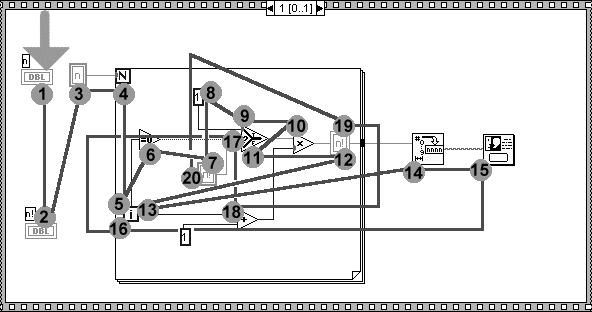
Our impression is that this scan path (which can easily be obtained automatically) may prove to be a very interesting tool (as analyzed by cognitive psychologists) with which to verify old hypotheses regarding the mental representation of programs and the cognitive processes involved in programming, in these new environments.
At the end of the session each tester was asked to reply in writing to about 20 questions. Some open
questions were included, and these obtained very interesting replies, from which, however, it was very
difficult to draw generalizations. The questionnaire mostly contained closed questions each generally
associated to a multi-point rating scale. The following lists some questions with average results from the
VIPERS and LabView testers (0 is the lowest mark, 10 is the highest one).
| Question | V | L |
|---|---|---|
| |
|
|
| Communicability of Visual Languages at a very first visual approach | 5.1 | 5.3 |
| Comprehensibility of the significance of each block | 6.0 | 6.3 |
| Comprehensibility of the data flow in input and in output of each functional block | 6.5 | 6.8 |
| Comprehensibility of control loops (while-do loop, for loop, if-then construct) | 7.5 | 5.5 |
| Comprehensibility of the data flow in the loop control | 4.6 | 5.3 |
| Ability to identify the sequential constraints (through the use of the control signals or of similar structures) | 5.8 | 5.5 |
| Ease of identifying the data type in input and in output of each functional block | 6.8 | 7.8 |
| How useful do you consider the visual approach to be for a non expert user ? | 5.1 | 5.6 |
This section will schematically list all the objectives of this study and specify the results obtained.
a) Significant and encouraging data was obtained regarding learning difficulties associated with visual languages as compared to textual languages.
b) The difficulties encountered by testers confirmed that it would be worthwhile to continue usability studies on the control constructs of visual dataflow languages (with particular attention paid to control cycles). With the tests we carried out, and the ones we plan to do, we are confident we can make a further contribution.
c) The results obtained from the tests and the questionnaires constituted useful feedback which will direct future elaboration of the VIPERS system in terms of improving its usability. In this regard we would like to highlight some evaluations:
d) We believe we have perfected a methodology for usability analysis which is effective, supplies a wealth of feedback, and is moreover fast and economical. In particular we would like to point out that:
[1] Hils, D. D., "Visual Languages and Computing Survey: Data Flow Visual Programming Languages", Journal of Visual Languages and Computing, vol. 3, 1992, pp. 69-101.
[2] Bernini, M., Mosconi, M. "Vipers: a Data Flow Visual Programming Environment Based on the Tcl Language", in Proceedings of AVI'94, ACM Press , 1994.
[3] Ambler, A. L., Burnett, M. M., "Visual Forms of Iteration that Preserve Single Assignment", Journal of Visual Languages and Computing, vol. 1, 1990, pp. 159-181.
[4] Shürr, A., "BDL - A Nondeterministic Data Flow Programming Language with Backtracking", in Proc. VL'97, IEEE Computer Society Press, 1997.
[5] Vose, G. M., "LabView: Laboratory Virtual Instrument Engineering Workbench", in BYTE, vol. 11, n. 9, McGrow Hill, 1986, pp. 82-84.
[6] Kimura, T. D., Choy, Y. Y., Mack, J. M., "Show and Tell - A Visual Programming Language", in Proc. VL'93, IEEE Computer Society Press, 1993, pp. 397-404.
[7] Auguston, M., Delgado, A., "Iterative Constructs in the Visual Data Flow Language", in Proc. VL'97, IEEE Computer Society Press, 1997, pp. 152-159.
[8] Helsel, R., Cutting Your Test Development Time with HP VEE, HP Professional Books/Prentice Hall, 1994.
[9] Green, T. R. G., Petre, M., "Usability Analysis of Visual Programming Environments: A 'Cognitive Dimension' Framework", Journal of Visual Languages and Computing, 7(2), 1996, pp. 131-174.
[10] Preece, J., A Guide to Usability. Human Factors in Computing, Addison Wesley, 1993.
[11] Nielsen, J., Mack, R. L. (Eds), Usability inspection methods, Wiley and Sons, 1994.
[12] Elena Ghittori, "Usabilità dei linguaggi visuali dataflow: il problema dei costrutti di controllo". Master's Thesis, Univ. di Pavia, 1998.
| gzipped postscript (size 924223 bytes) | zipped postscript (size 905516 bytes) |